Claim forecasting
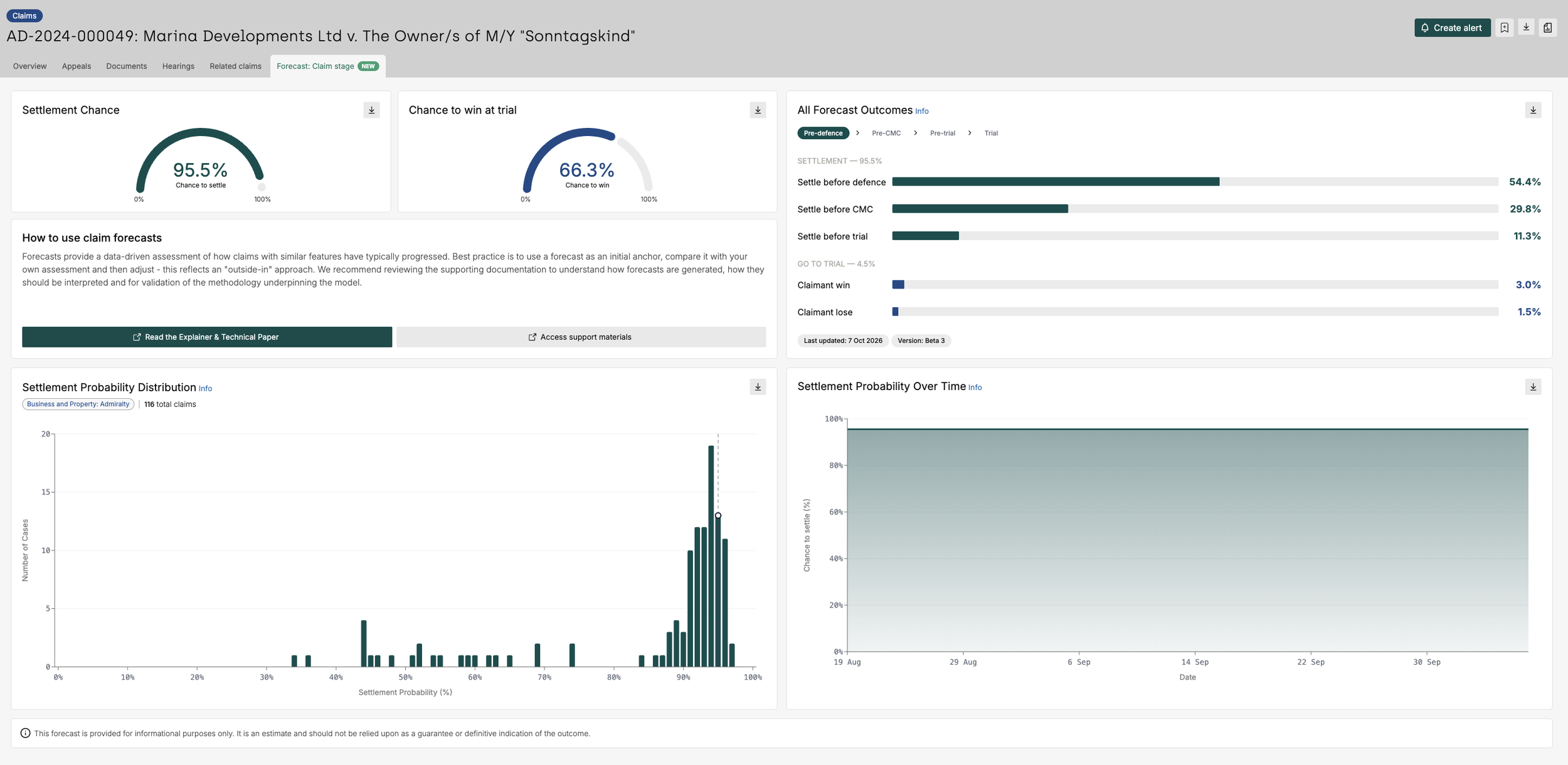
Claim forecasting is designed to provide users with a data-driven assessment of the likely progression and outcome of a claim, helping you assess risk, challenge assumptions and make more informed decisions. This is intended to complement professional judgment, not replace it.
The forecasts are generated using historical litigation data and statistical analysis of acknowledged claims within the Solomonic dataset. The model identifies patterns and outcomes from similar disputes but does not analyse pleadings, evidence, claim documents, legal arguments or the underlying merits of a case. Forecasts should be considered alongside your own expertise and case-specific knowledge.
This page provides an quick overview of what claim forecasting is, where to find it within the platform, how to access it and they key caveats you should be aware of when using it. Consider this your quick-start guide to claim Forecasting, covering the essentials in just a few minutes.
For a deeper understanding of the forecasting model, including the methodology behind the predictions and the best practice guidance on incorporating forecasts into your decision making, please refer to our full Claim Forecasting Manual - we strongly recommend reviewing this document.
On this page:
What does claim forecasting show and which claims are covered?
How to use claim forecasting effectively
Accessing forecasts on the platform
Important notes
What does claim forecasting show?
For eligible claims, claim forecasting provides estimates for:
The likelihood of settlement at different stages of proceedings
The likelihood that a claim will proceed to trial
The likelihood of success if the claim reaches trial
The forecasts are intended the provide an objective baseline that can be used alongside your own expertise and knowledge of a matter.
A forecast is first generated once a claim has been acknowledged by the defendant(s). These forecasts are updated throughout the life of a claim as additional information becomes available and the claim stage progresses through the litigation process.
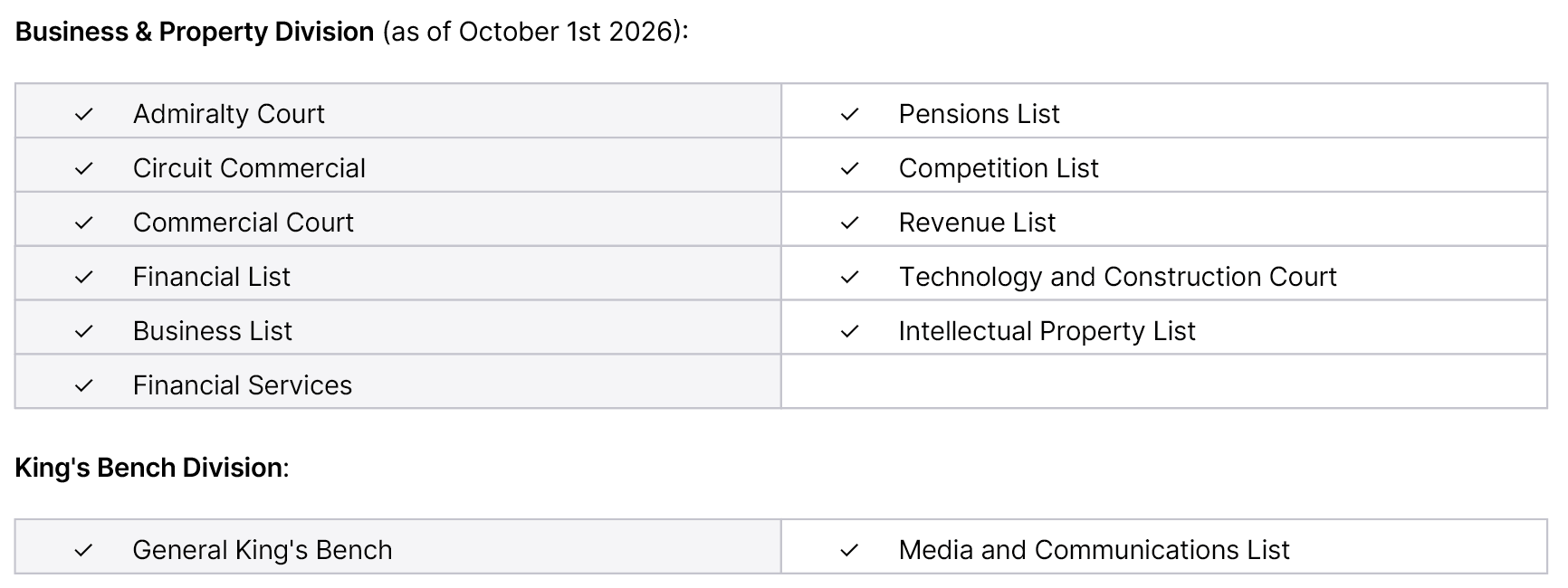
Eligible claims are those that have been acknowledged or are still ongoing claims - within supported courts. The initial release primarily covers commercial matters in the Business & Property Division and King's Bench Division.
How should it be used?
Start with the forecast as an objective baseline
Consider information known to you but unavailable to the model
Adjust only where there is evidence that the claim differs from comparable historical matters
Focus on probability rather than certainty, and reassess as the dispute evolves
Accessing forecasts
You can:
View all claims with a forecast
View individual claim forecasts
To view all claims with a forecast
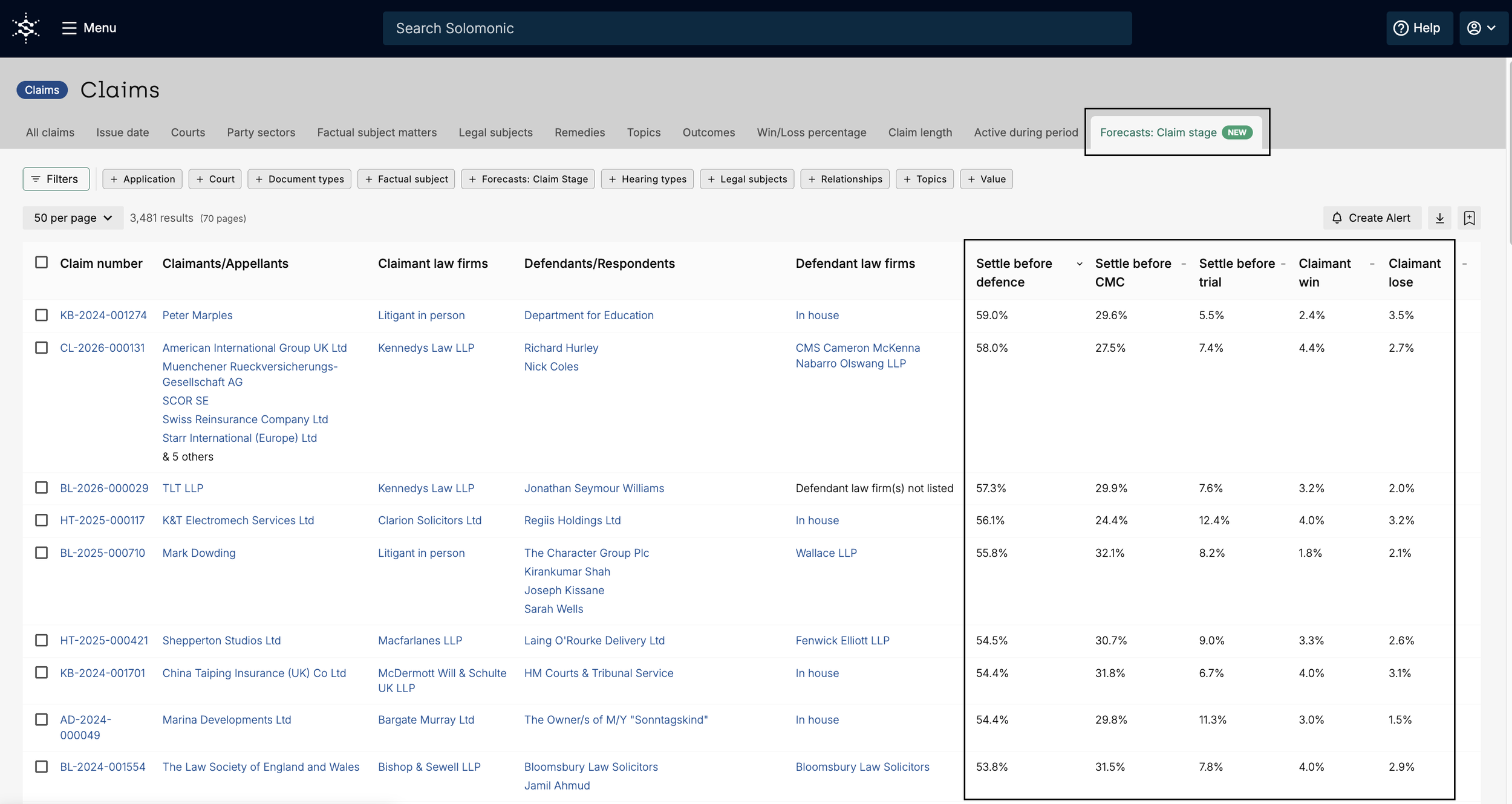
Navigate to the claims listing page and select the "Forecasts: Claim stage" from across the top of the page.
From here, you can review the forecast outcomes displayed for each claim.
To view forecasts for an individual claim
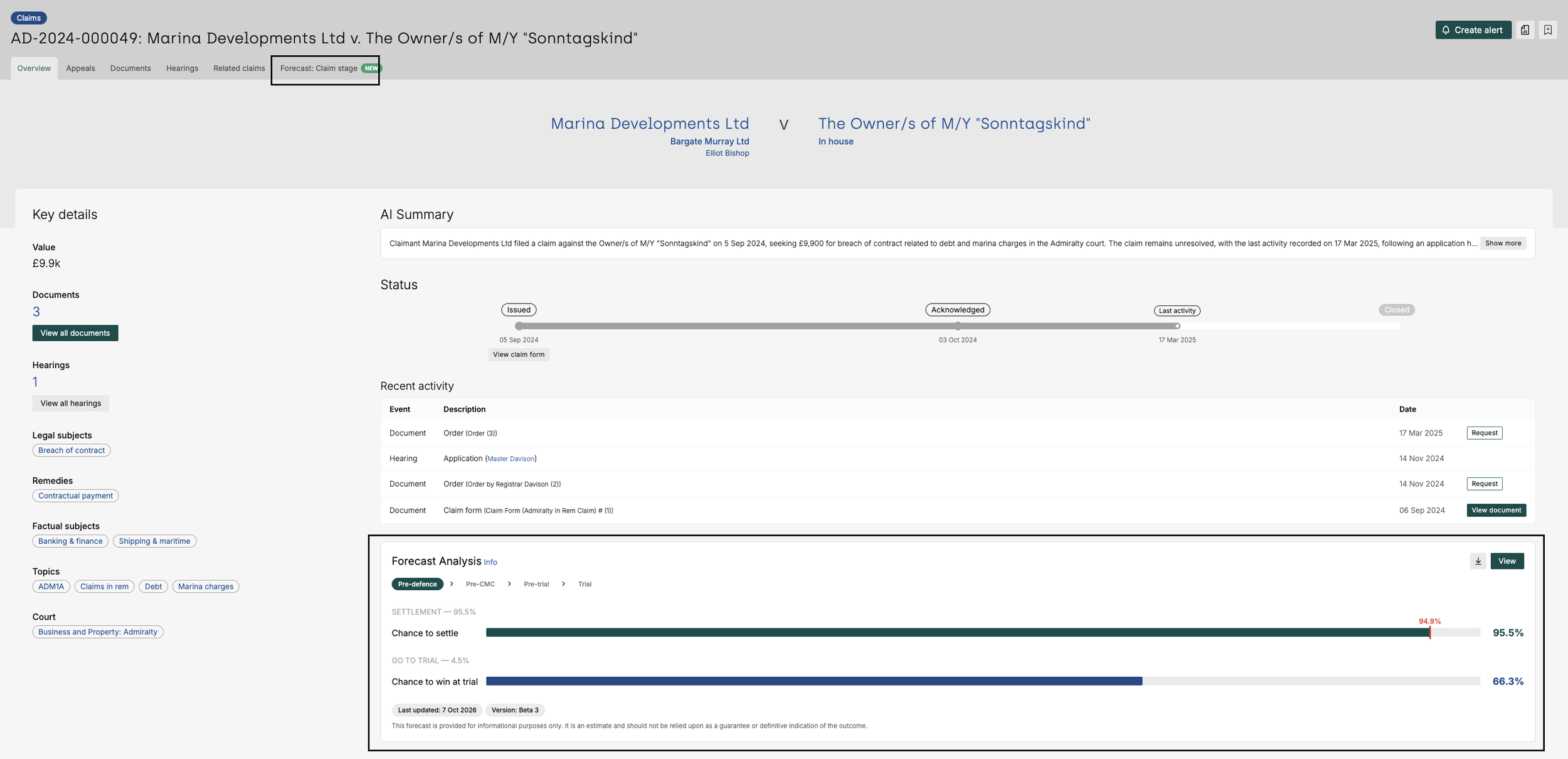
Select an eligible claim to see a forecast overview on the claim page itself. You will find it below the “Recent activity” section of the claim page.
You can then click on the "Forecast: Claim stage" tab across the top of the page to view a more detailed analysis.
Understanding the data
Finding appeals and permissions to appeal
You can find a list of appeals and permissions to appeal on the platform by navigating to the claims listing page and using our Court filter to apply the ‘Court of Appeal’. Click here to access this listing page.
There are some important notes to bear in mind about the results returned when using other filters on this page.
If you filter by:
Issue date:
This refers to the date of the order or judgment subject to appeal.
Outcome:
This returns results for the outcome of the entire case. For example, if a claim has succeeded but was later appealed and the original judgment was overturned, the outcome would be recorded as “Failed”.
Topics, legal subject matters, factual subject matters, remedies:
These reflect the tags on the appeal, not the originating claim.
Value, relationships, applications, document type, hearing type, injunctions, last activity”
These point to the data on the appeal, not the originating claim.
Party sector:
This filters for the sector of the parties in the appeal, but as stipulated in our caveats above, the parties listed on the appeal may not be accurate until we can confirm via judgment.
How do we display appeals data on claim landing pages?
For claims with appeals, you will find all related appeals on the left-hand side of the page, under ‘Key details’. If there has been any recent appeal activity, you will also find this in the ‘Recent activity’ section of the page.
To view all appeal related activity pertaining to the claim click on the dropdown next to the claim number and select ‘Appeals’. ]
Please note:
An appeal update will only appear in the claim activity timeline if there has been a concluding decision on the appeal relating to the final judgment of the originating claim.
If we are unable to determine whether an appeal decisions relates to the final judgment, it will not be shown in the claim timeline.
Interim decisions are also not displayed in the claim timeline
Use cases & best practices
Track claims and appeal developments
Track your matters without having to manually check Case Tracker.
Set up an alert on a first-instance claim to receive updates on any related CoA activity
If you’re subscribed to this module, this will automatically be enabled for you. That is, if you’re tracking a claim on Solomonic, you will now be alerted to activity on the original claim and any related Court of Appeal activity, including permission to appeal and appeal proceedings.
For example:
You can track the UK Developers v Apple - App Store commission Fees (Ennis v Apple Inc.) claim to monitor the outcome of application for permission to appeal.
Monitor key appeals
Our “Newly lodged appeals” alert allows you to proactively track new appeals.
You can also monitor key appeals by using the claims listing page and filtering by the Court of Appeal in the Court filter. You will find a list of appeals that you’re able to monitor.
From here, you are able to:
Favourite the appeal listing page so you can immediately access this page at the click of a button from the Solomonic homepage
Create alerts for appeals individually or in bulk
Research Court of Appeal judgments
Search and analyse over a thousand judgments by party, judge, topic, legal issues and more - making it easier to stay informed and investigate historic patterns. Use the Judgments listing page and filter by the Court of Appeal in the Court filter to find and analyse over 1000 judgments.
From here, you can:
Link the appeal judgment to its originating first instance claim
Filter by subject matter or judge to analyse specific records
Leverage Court of Appeal analytics
Gain appeal-level market intelligence. See appeal outcomes, including upheld and overturned decisions, reflected directly within originating claim timelines - offering insight into how disputes play out beyond first instances.
Use the judgment analytics section of the platform and filter by Court of Appeal in the Court filter to interrogate the data.
For example:
On Judgments Win/Loss percentage chart, we see that 63.2% of appeals fail, providing a key metric for client discussions