The Insolvency Module
Although we are unable to extract information from insolvency court documents in the same way we do for other courts due to court-imposed limitations, the module continues to provide valuable market intelligence and business development insights to professionals operating in this field.
The module is designed to provide early visibility and actionable market intelligence, helping both law firms and insolvency practitioners understand who is instructing whom, which sectors are under pressure and where new opportunities may arise.
On this page:
Use cases
Driving market intelligence and business development: for law firms
Winning work: for insolvency practitioners
Understanding insolvency claims displayed on Solomonic
Caveats and limitations
Use cases
Driving market intelligence and business development: for law firms
Law firms instructed by insolvency practitioners (IPs) can use Solomonic’s Insolvency Module as a powerful market intelligence and business development tool. The module enables firms to monitor insolvency activity, understand IP-law firm relationships and identify emerging sector trends and opportunities.
Be the first to know about new insolvency actions
Early awareness is critical. Insolvency practitioners are often instructed before an action appears in the Gazette, and filings on Ce-File may precede public reporting. Use our alerts to build dedicated insolvency alerts.
To monitor new insolvency actions:
Access Alert Builder by clicking on your ‘My Alerts’ page from your profile dropdown.
Click on ‘Alert Builder’ on the top right hand corner of the screen.
Click on ‘Courts’ from the menu and select ‘Company and Insolvency’.
Add additional data filters if you’d like - you can select specific application types, for example, winding up petitions.
Monitor hearings in the Insolvency and Companies List:
Access your hearing alerts by clicking on the ‘My featured alerts’ page from your profile dropdown.
Click on ‘Subscribe’ for ‘High Court hearings’ and select ‘Company and Insolvency’.
Track specific companies of interest:
Access Alert Builder by clicking on your ‘My alerts’ page from your profile dropdown.
Click on ‘Alert Builder’ on the top right hand corner.
Under ‘Parties’, choose one of the following:
“Search parties” to select from an existing list of parties from the platform
“Search term” to create a free-text alert
Add the parties or terms you’re interested in and click ‘Next’.
Click ‘Add filter’ and select Court. Select ‘Company and Insolvency’ from the list.
Add any additional filters if needed or click complete to finish.
Identify sector trends and companies showing signs of distress
Analyse IP-Law firm relationships
What to expect (important caveats)
Court of Appeal data can be inconsistent at source. We work around this as best we can but it is helpful to understand what these limitations are.
Limitations and implications:
Case Tracker does not display law firms
We are therefore only able to confirm this data once the judgment is published.
Case titles may be reversed or list incorrect parties
Case Tracker displays appeal titles using the first named party from each representative side in the original claim. This may not necessary be the correct entities and may not reflect the correct appellant/respondent roles.
Final confirmation of the correct parties and their positions are, again, only possible once the judgment is published.
Case Tracker generally removes older or concluded appeals, including failed permissions to appeal. This appears to be their standard practice.
We began gathering appeals data in March of 2025 and we do not delete appeals from our platform. Over time, this means we will build a growing historical record of appeals that remains accessible to users.
As this dataset expands, our appeal analytics will continue to become richer, comprehensive and insightful.
Hearing dates are not always accurate
We scrape the Court Cause List at 4:00pm and 4:30pm each day to generate our Hearings alert, which is sent at around 5:30pm. At the time our alerts were being developed, the Courts advised that the Hearing List would be finalised by 4:30pm.
Court processes have since changed, meaning hearings may be added or amended later in the evening or early the next morning, after our alert has been sent.
To mitigate this, we run an additional scrape at 11:00pm to capture any changes or new Hearings added. You can view our Hearings Listing Page for a more up-to-date view. Having said this, please do bear in mind that some late changes may still not be captured on the day of.
Where possible, we correct and validate information once a judgment or more authoritative data becomes available.
Understanding the data
Finding appeals and permissions to appeal
You can find a list of appeals and permissions to appeal on the platform by navigating to the claims listing page and using our Court filter to apply the ‘Court of Appeal’. Click here to access this listing page.
There are some important notes to bear in mind about the results returned when using other filters on this page.
If you filter by:
Issue date:
This refers to the date of the order or judgment subject to appeal.
Outcome:
This returns results for the outcome of the entire case. For example, if a claim has succeeded but was later appealed and the original judgment was overturned, the outcome would be recorded as “Failed”.
Topics, legal subject matters, factual subject matters, remedies:
These reflect the tags on the appeal, not the originating claim.
Value, relationships, applications, document type, hearing type, injunctions, last activity”
These point to the data on the appeal, not the originating claim.
Party sector:
This filters for the sector of the parties in the appeal, but as stipulated in our caveats above, the parties listed on the appeal may not be accurate until we can confirm via judgment.
How do we display appeals data on claim landing pages?
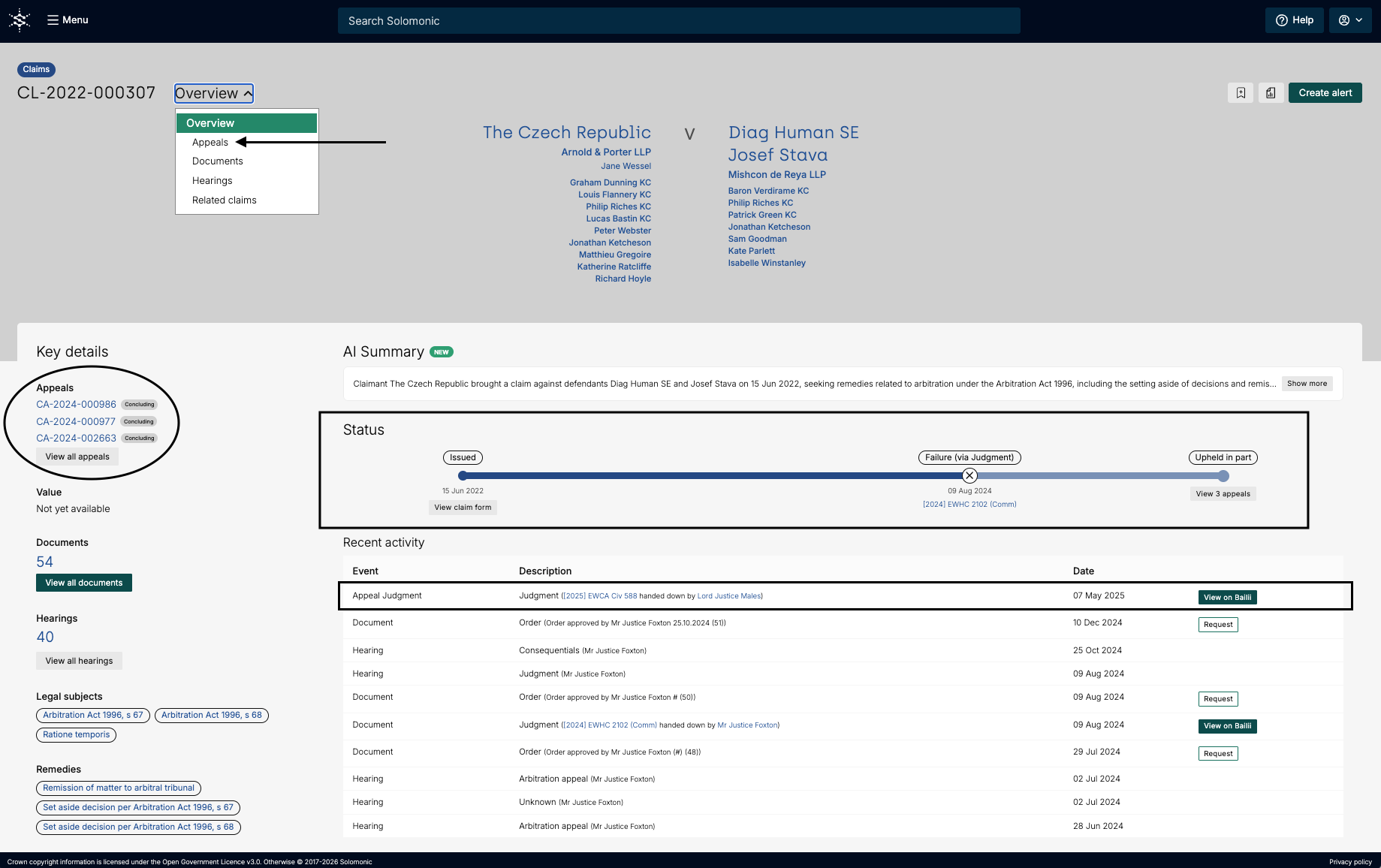
For claims with appeals, you will find all related appeals on the left-hand side of the page, under ‘Key details’. If there has been any recent appeal activity, you will also find this in the ‘Recent activity’ section of the page.
To view all appeal related activity pertaining to the claim click on the dropdown next to the claim number and select ‘Appeals’. ]
Please note:
An appeal update will only appear in the claim activity timeline if there has been a concluding decision on the appeal relating to the final judgment of the originating claim.
If we are unable to determine whether an appeal decisions relates to the final judgment, it will not be shown in the claim timeline.
Interim decisions are also not displayed in the claim timeline
Use cases & best practices
Track claims and appeal developments
Track your matters without having to manually check Case Tracker.
Set up an alert on a first-instance claim to receive updates on any related CoA activity
If you’re subscribed to this module, this will automatically be enabled for you. That is, if you’re tracking a claim on Solomonic, you will now be alerted to activity on the original claim and any related Court of Appeal activity, including permission to appeal and appeal proceedings.
For example:
You can track the UK Developers v Apple - App Store commission Fees (Ennis v Apple Inc.) claim to monitor the outcome of application for permission to appeal.
Monitor key appeals
Our “Newly lodged appeals” alert allows you to proactively track new appeals.
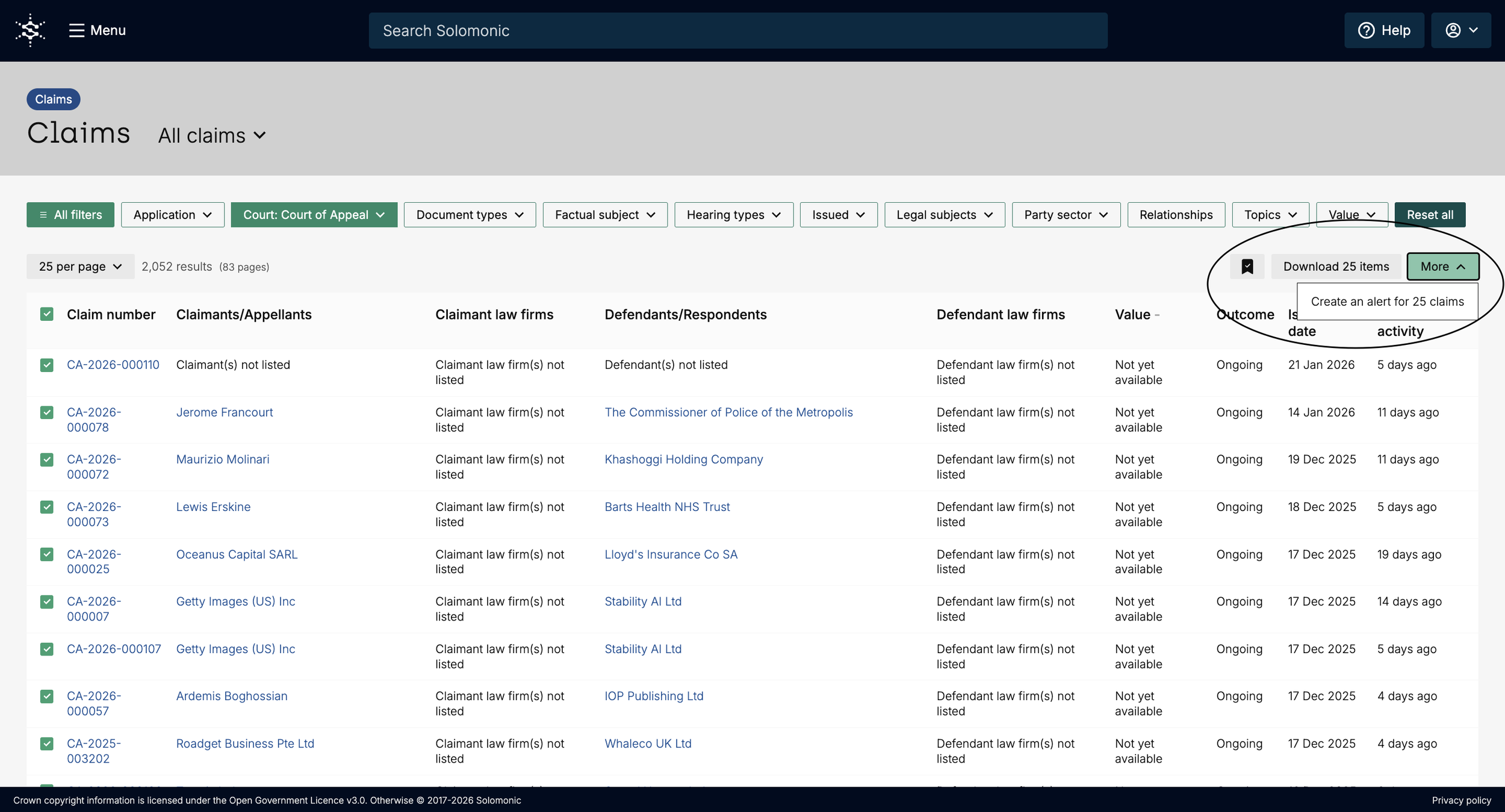
You can also monitor key appeals by using the claims listing page and filtering by the Court of Appeal in the Court filter. You will find a list of appeals that you’re able to monitor.
From here, you are able to:
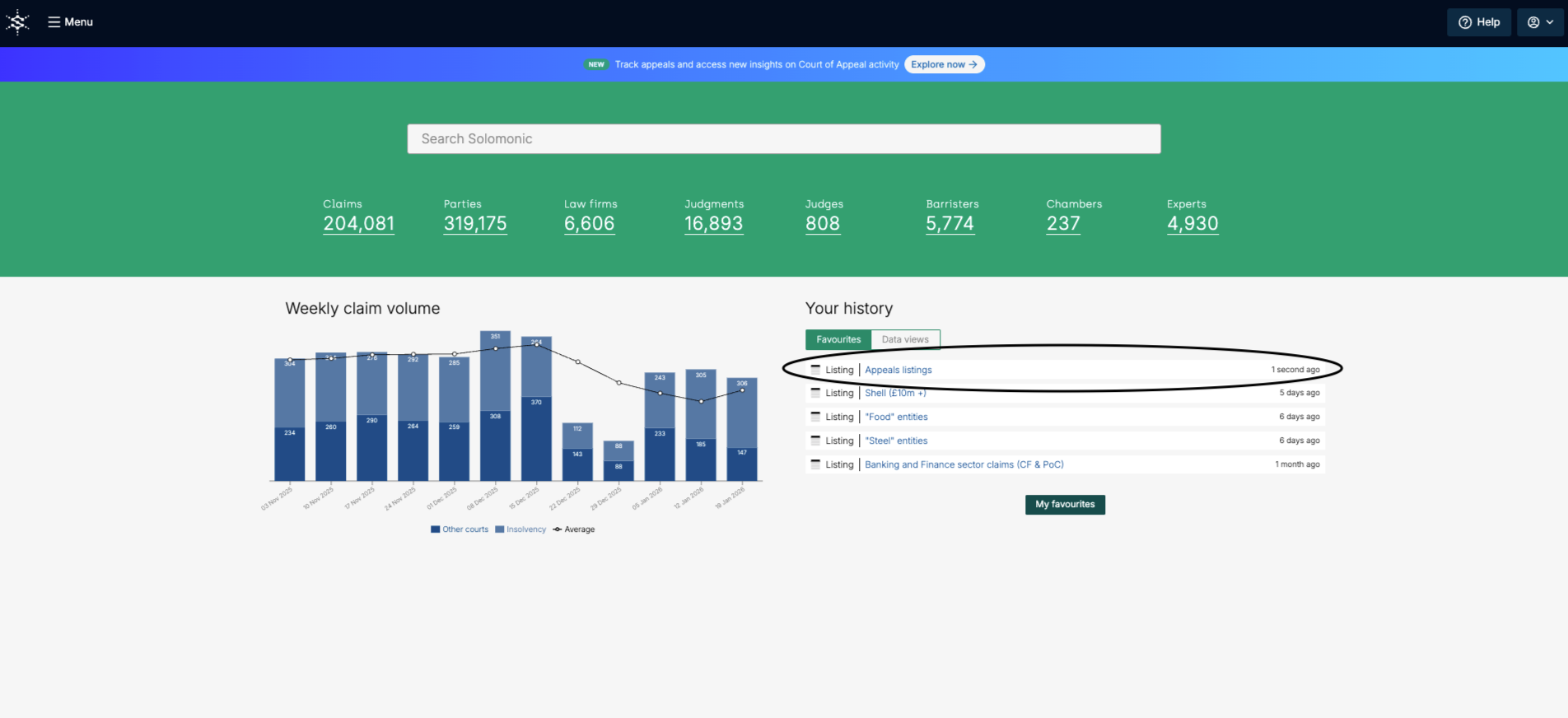
Favourite the appeal listing page so you can immediately access this page at the click of a button from the Solomonic homepage
Create alerts for appeals individually or in bulk
Research Court of Appeal judgments
Search and analyse over a thousand judgments by party, judge, topic, legal issues and more - making it easier to stay informed and investigate historic patterns. Use the Judgments listing page and filter by the Court of Appeal in the Court filter to find and analyse over 1000 judgments.
From here, you can:
Link the appeal judgment to its originating first instance claim
Filter by subject matter or judge to analyse specific records
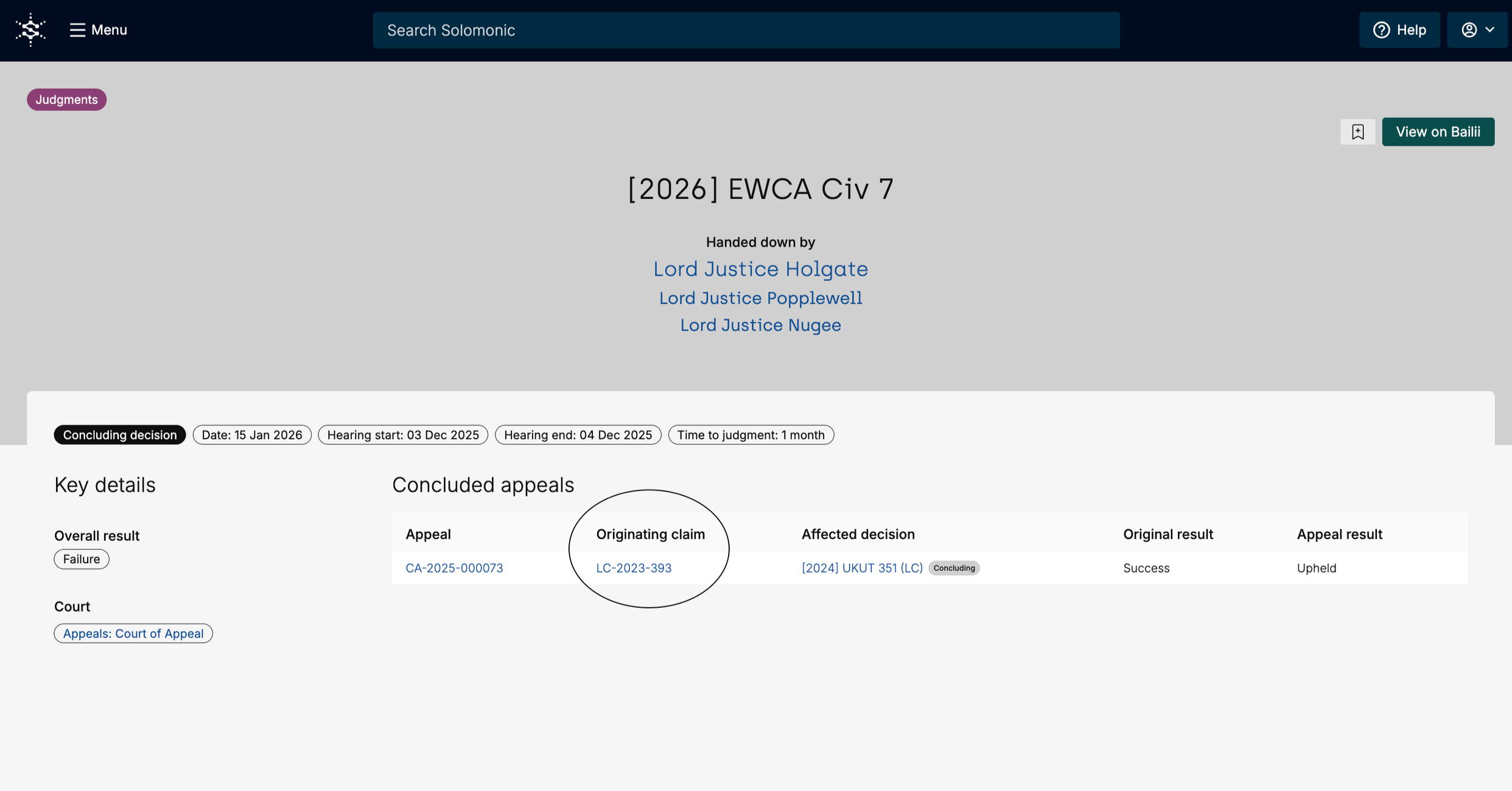
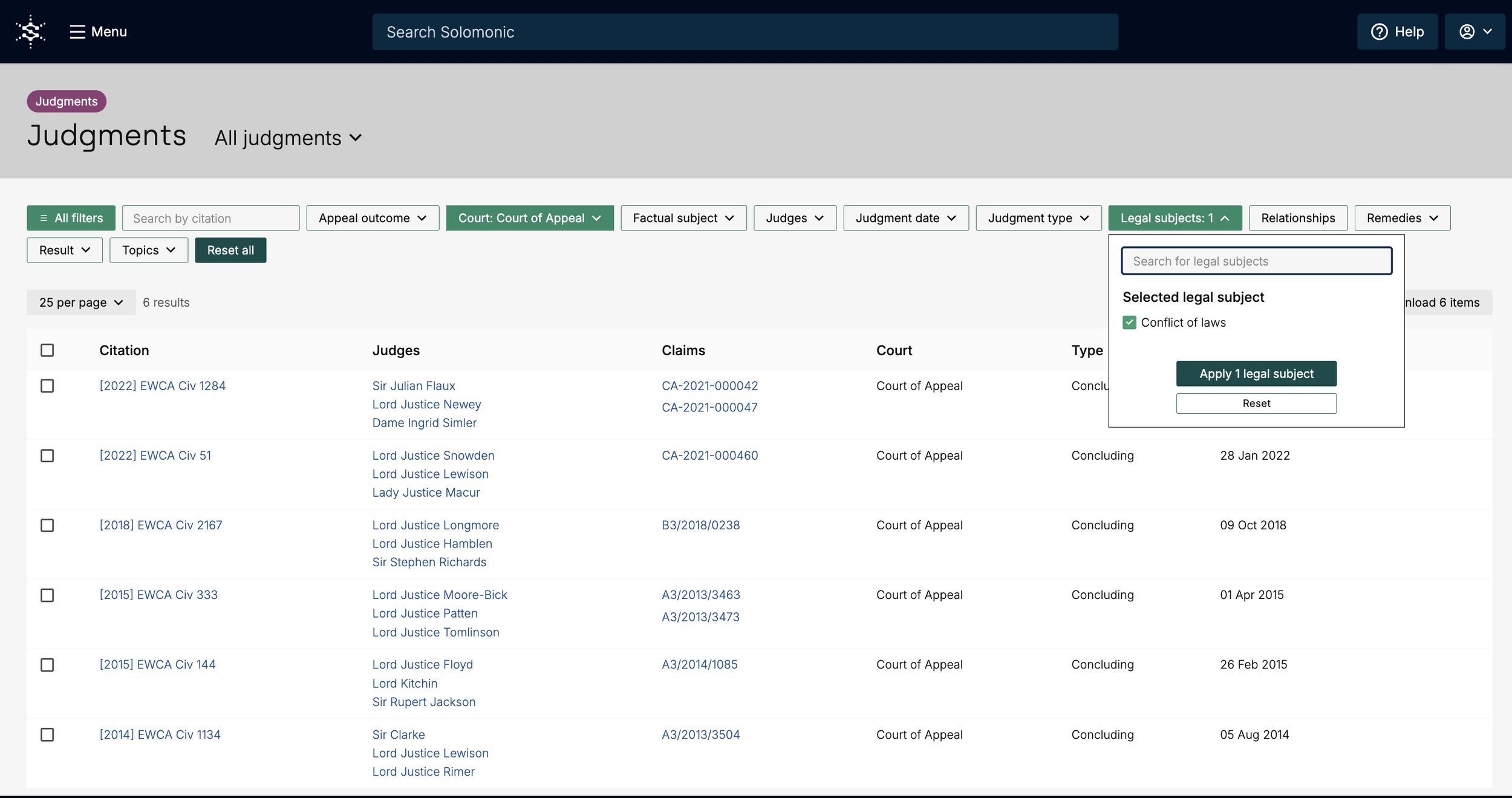
Leverage Court of Appeal analytics
Gain appeal-level market intelligence. See appeal outcomes, including upheld and overturned decisions, reflected directly within originating claim timelines - offering insight into how disputes play out beyond first instances.
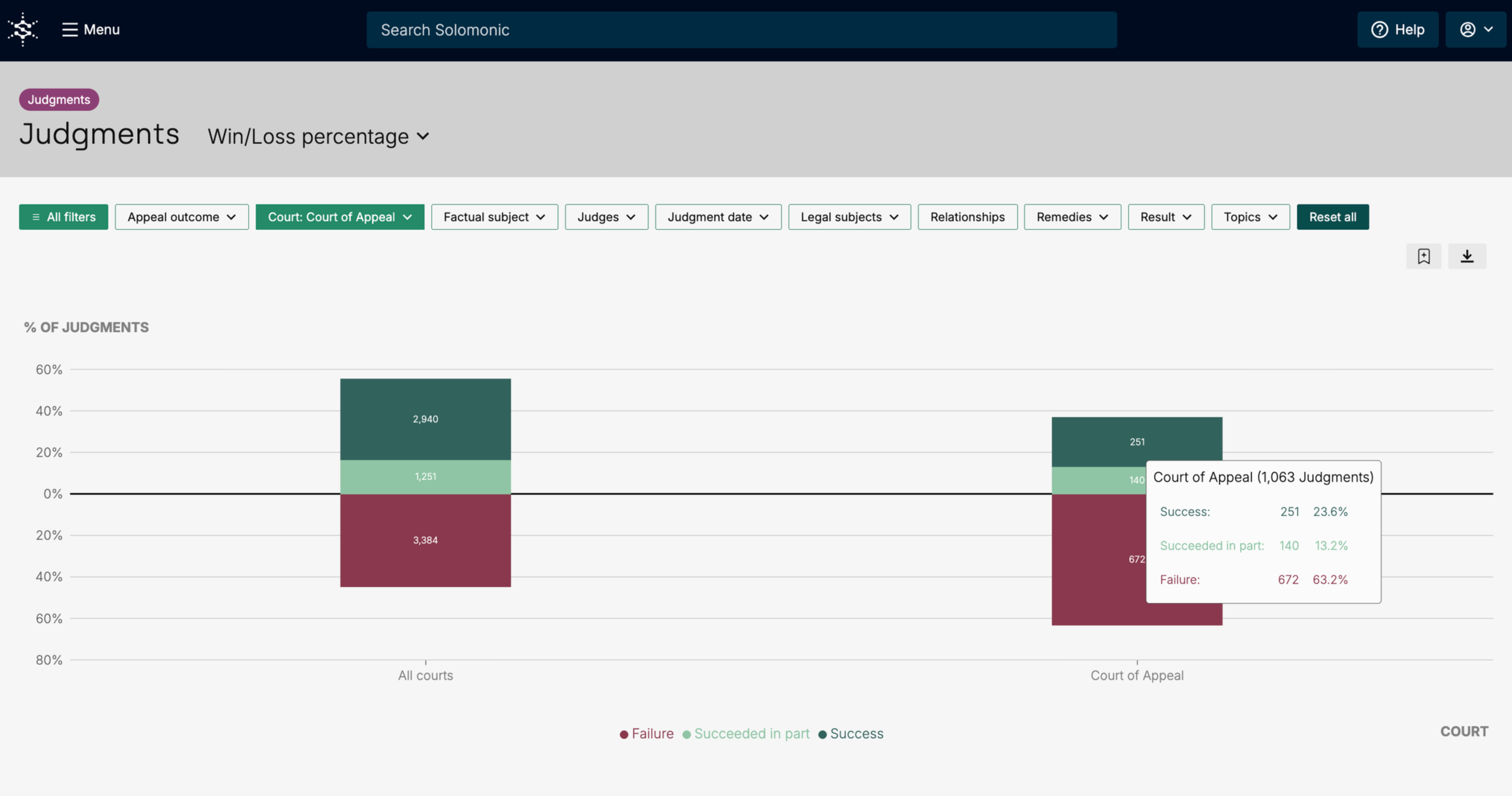
Use the judgment analytics section of the platform and filter by Court of Appeal in the Court filter to interrogate the data.
For example:
On Judgments Win/Loss percentage chart, we see that 63.2% of appeals fail, providing a key metric for client discussions